Cost Per Invoice Processed Calculation for AP Automation
Here's what an honest cost baseline reveals about what automation actually saves.

Cost per invoice is the number every AP leader quotes and almost no one calculates correctly. Most teams divide total AP headcount cost by invoice volume, get a figure that looks clean, and use it to build a business case for automation. That number is directionally useful and analytically incomplete: it leaves out error remediation, exception handling, storage, and audit work, and it assumes a tool will erase entire labor categories rather than just moving where the effort lands. The result is predictable. Teams set ROI targets on an incomplete baseline, implement a tool, and then wonder why realized savings fall short of the pitch deck.
This piece builds the complete formula, walks through every input, and shows which variables automation actually touches versus which ones stay exactly where they were. It's written for AP teams evaluating tools and for the developers building the pipelines underneath them, because both groups need the same honest number.
The components of a fully loaded cost-per-invoice
The full formula looks like this: total cost per invoice equals direct labor, plus technology, plus error remediation, plus exception handling, plus overhead allocation, plus storage and audit, all divided by invoice volume. Each piece deserves its own explanation, because each one gets undercounted in a slightly different way.
Direct labor covers the time spent on receipt, data entry or extraction review, coding, approval routing, and payment initiation. Fully loaded means salary plus benefits, payroll taxes, and a share of management overhead, not just the hourly wage someone quotes off a pay stub. The per-invoice labor cost is the annual fully loaded cost of AP staff divided by invoices processed per year per full-time employee, and that ratio swings wildly between organizations depending on process maturity and invoice mix.
Technology and tooling includes the ERP license cost allocated to the AP function, any automation platform or document extraction API (often priced per page or per document), and infrastructure spend for anyone running on-premise. This is where a lot of ROI math quietly breaks: teams treat the subscription cost as a separate line item, calculate labor savings against the old baseline, and then report an ROI figure that never subtracted the tool's own cost. The technology line belongs in the same denominator as everything else.
Error remediation is the cost of finding, investigating, and fixing keying errors, duplicate payments, and misapplied invoices, plus the downstream work: ERP correction entries, vendor statement reconciliation, debit memo processing. None of this shows up in invoice volume. A team that processes fewer invoices but carries a high error rate pays more per invoice than its throughput numbers would suggest, and industry benchmarking consistently shows the true cost climbing well above the headline processing figure once remediation gets added back in.
Exception handling covers any invoice that can't complete straight-through processing, meaning it needs a human somewhere along the way. Exception cost isn't uniform: a price variance takes different work than a missing purchase order. Weighted exception cost is the share of invoices that become exceptions, times the average labor time per exception type, times the fully loaded labor rate. Most organizations underestimate this line because exception work gets spread across the AP staff instead of tracked as its own cost center.
Overhead allocation includes physical space, utilities, IT support, and compliance functions that support AP, usually allocated as a percentage of department headcount cost. Smaller teams tend to skip this entirely; it becomes material once you hit mid-market and enterprise scale. Storage and audit rounds out the formula: document retention costs, scanned image storage, retrieval systems, archiving for statutory compliance periods, plus the labor spent pulling invoice documentation whenever an audit comes calling.
Where organizations set their benchmark and what the range actually reflects
Industry benchmarking groups publish a wide spread of cost-per-invoice figures, and the gap between top and bottom performers runs into multiples, not small percentage differences. That spread reflects real structural differences, not just who runs a tighter shop.
Invoice mix matters enormously. A team processing mostly three-way-match purchase order invoices against clean supplier data starts from a structurally lower cost position than a team handling a high share of non-PO, services, or contract invoices. Volume matters too, since fixed AP infrastructure amortizes very differently across ten thousand invoices a year versus a million. Geography and labor market shift the picture further: fully loaded labor rates vary a great deal by location, which makes side-by-side comparisons between organizations in different markets close to meaningless. And ERP maturity plays its part; teams running modern, integrated platforms with native AP modules carry lower per-invoice technology overhead than teams stitching together legacy systems with manual bridges.
Best-in-class figures already include the technology subscription. The benchmark isn't a pre-tool baseline you're supposed to beat before buying software; it's the target cost with the tool already factored in. So closing the gap between your current cost and the benchmark means understanding which components are driving your premium, not just accepting that a gap exists and hoping a new tool closes it. Automation at scale can cut per-invoice cost by a wide margin, but only for the pieces of the formula it actually reaches, and that's not the whole formula.
Which variables automation actually moves — and which it does not
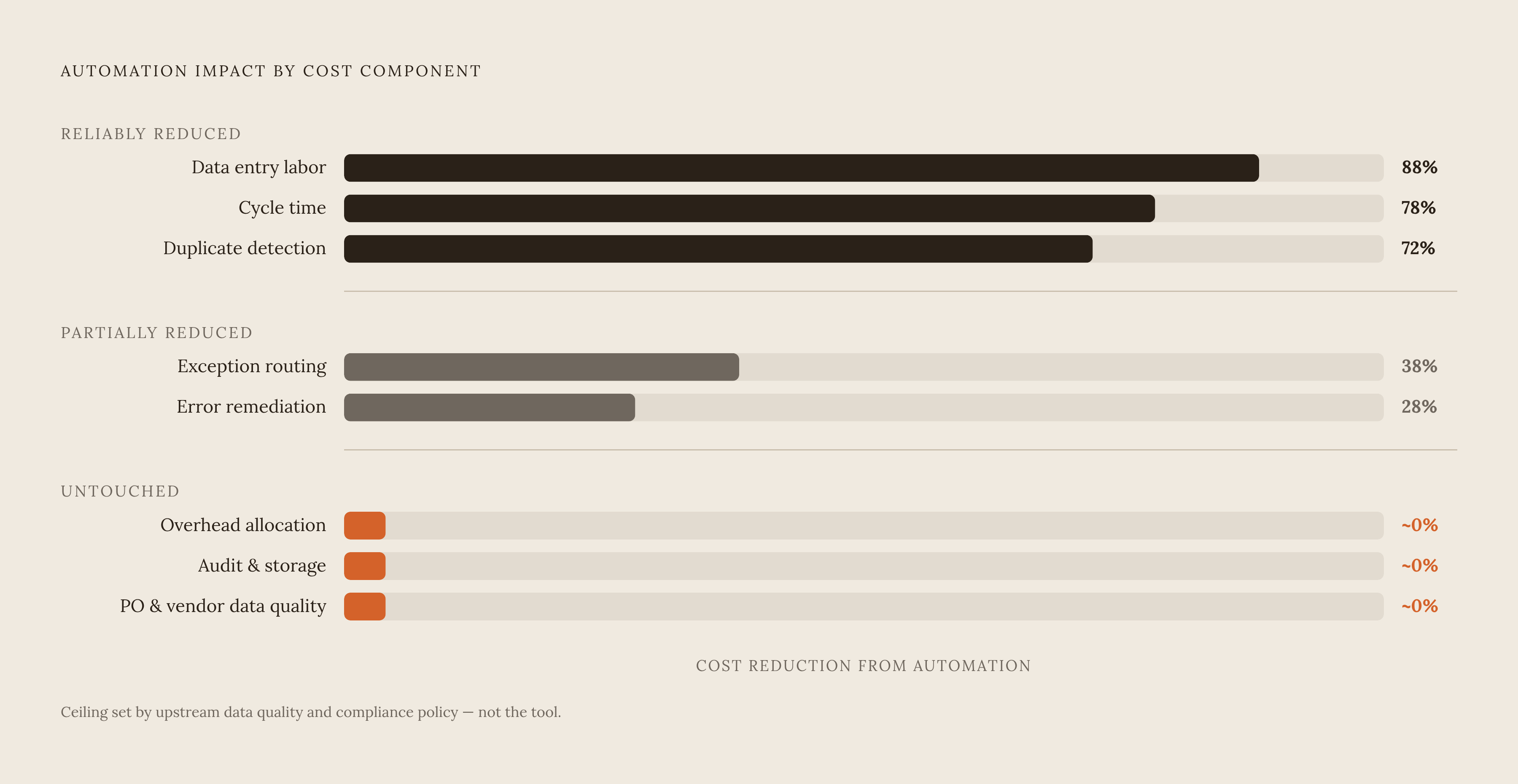
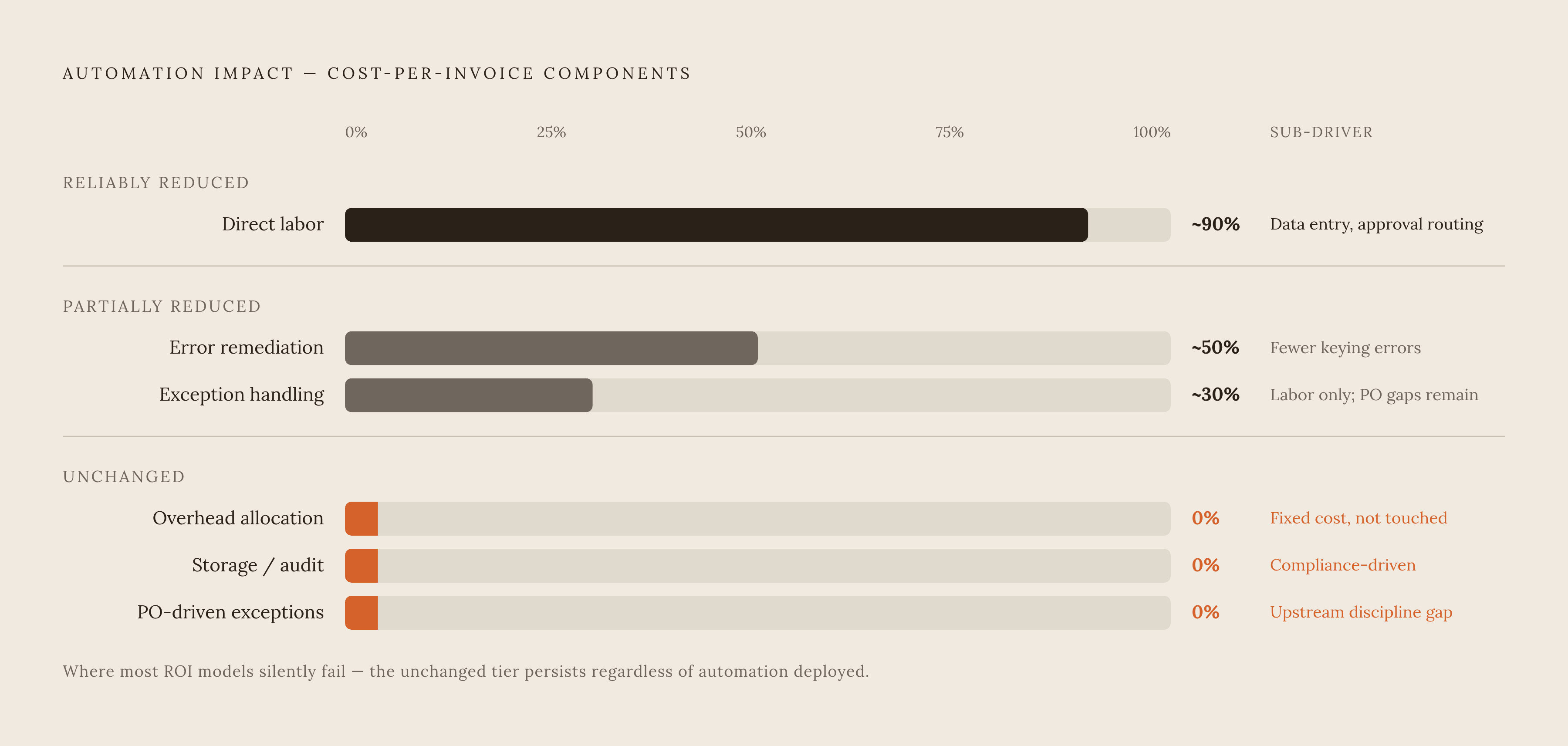
Automation reliably reduces direct data entry labor. This is the clearest win: extraction tools cut or eliminate keying time for structured fields on clean, high-quality documents. Cycle time drops too, since faster routing through approval workflows cuts both the labor cost of chasing approvals and the working capital cost tied to payment timing. Duplicate payment detection improves as well, since automated matching catches duplicates at a rate manual review can't match, which shrinks a specific and often sizable error cost.
Some things only get partially better. Exception handling labor falls somewhat, because automation can route exceptions faster and pre-populate the queue with context, but it doesn't resolve exceptions. A human still adjudicates most of them. Error remediation drops too, in one sense: fewer keying errors means fewer downstream corrections. But the extraction layer itself introduces a new category of mistakes, misread totals, swapped fields, misread line items, and that remediation work may not even get tracked against the AP function at all.
Then there's what automation never touches. PO discipline and vendor master quality remain the biggest driver of exception rates, and none of that lives inside an AP tool's control: bad PO numbers, missing goods receipts, and vendor setup errors are upstream problems. Overhead allocation barely moves either, since AP headcount may shrink but shared infrastructure costs don't scale down in proportion. Audit and storage requirements are usually set by compliance policy, not by how invoices get processed, so automation has no bearing there.
The honest ceiling on touchless processing is set by PO discipline and supplier data quality, not by how good the extraction tool is. Teams that skip this reality check will consistently land short of their projected savings. The practical takeaway for anyone building an ROI model: apply automation's benefit only to the components it actually reaches, and use a realistic throughput rate, not the number from the vendor's best-case demo.
How extraction accuracy directly enters the cost formula
Extraction accuracy isn't a technology metric that lives off to the side. It's a direct cost input, because every misextracted field generates downstream labor that belongs in the cost-per-invoice calculation whether anyone tracks it there or not.
The right way to measure this is field-level accuracy against ground truth, not character accuracy and not an overall model benchmark score. A system can correctly capture the vast majority of characters on a page and still misread the invoice total, the tax ID, or a line item quantity, which means the character accuracy score looks great while the cost-per-invoice impact looks exactly like a data entry error. Document-level accuracy, meaning the share of invoices with zero extraction errors, is the number that actually governs your straight-through processing rate.
Confidence calibration is where this turns genuinely dangerous. A well-calibrated system routes low-confidence extractions to human review, a known cost center that AP teams can staff and measure. A poorly calibrated system does the opposite: it passes high-confidence extractions that are actually wrong straight into the ERP, generating error costs that never show up in the tool's own reporting but surface later in reconciliation. Teams evaluating extraction vendors should pull a sample of high-confidence extractions and check them by hand; the error rate in that sample is the real miscalibration cost, not whatever number sits on the vendor's spec sheet.
Production edge cases concentrate accuracy costs disproportionately. Degraded scans, non-standard layouts, handwritten annotations, and multi-currency invoices are a small share of total volume but account for an outsized share of extraction failures and remediation work. Demo-quality accuracy on clean sample invoices tells you almost nothing about production accuracy on the messy document mix a real AP inbox actually contains.
Vendors who offer contractual field-level accuracy guarantees, charging only for correctly extracted pages, turn accuracy into a financial commitment instead of a marketing claim, and that structure lines their incentives up with the cost formula the AP team is actually managing. Vendors who won't commit to a field-level service-level agreement are, functionally, handing the full cost of miscalibration and edge-case failure back to the AP team's error remediation line.
Building the ROI calculation step by step
Start by establishing the current fully loaded cost per invoice. Pull total AP department cost, salaries, benefits, overhead allocation, and technology, then add an estimate for error remediation: time spent on corrections, duplicate resolution, and vendor reconciliation. Even a rough estimate here changes the final number materially. Add the weighted exception cost next, tracked over a representative period, and divide the total by invoice volume for that same period.
Next, figure out which cost components automation will actually affect given your specific invoice mix. What share of invoices are PO-backed with clean matching data, since those carry the highest straight-through potential? What's your current exception rate, and how much of it traces back to extraction errors versus upstream data problems? What does error remediation cost you today; if it's already low, the benefit from reducing it is correspondingly small.
Then apply realistic automation rates, not the vendor's best-case number. Use the industry median touchless rate as your base case rather than the best-in-class ceiling, unless your PO discipline already matches best-in-class. Build a conservative scenario (current touchless rate with modest improvement) and a target scenario (what's achievable given your actual document mix and PO discipline), and keep both in front of you.
Subtract the fully loaded cost of the automation layer itself: per-page extraction pricing, platform subscription, integration and implementation labor, ongoing IT support, plus transition costs like staff retraining and a parallel-run period. Then calculate net cost per invoice at your projected touchless rate and compare it to the baseline, expressing the result both as a per-invoice difference and as total annual savings at current volume. The per-invoice number tells you direction; the annual number tells you whether it's material. Note the volume threshold where the investment breaks even, since that threshold often decides the go or no-go call for smaller organizations.
A few mistakes show up again and again. Teams apply the best-in-class benchmark as though it's achievable in year one, when it usually takes several years of process improvement alongside the tool to get there. Teams count labor savings before confirming headcount is actually reduced or redeployed; freed-up capacity that never turns into a real cost reduction isn't savings, no matter how it's framed. And teams ignore the extraction accuracy variable altogether, so a tool with a lower subscription price but a higher error rate ends up costing more per invoice once remediation gets added back into the formula.
What the cost structure looks like when you build the extraction layer yourself
Build decisions usually get made on API pricing alone, comparing a vendor's per-page extraction cost to the sticker price of calling a cloud OCR or language model endpoint directly. That comparison leaves out almost all of the real cost.
A build project needs initial pipeline engineering: receipt handling, OCR or vision model integration, field extraction logic, output schema validation, and ERP integration. That's typically months of senior engineering time, not weeks. Then comes edge case discovery: the first version handles clean invoices fine, and production immediately surfaces degraded scans, non-standard layouts, multi-page documents with inconsistent structure, and vendor-specific formatting quirks, each one demanding its own investigation and code change. Ongoing model maintenance follows and never really stops, since document formats shift, vendors update their templates, and the underlying OCR or AI models get versioned and deprecated on someone else's schedule. Someone on staff owns that permanently.
Confidence scoring and a human-review routing layer add another engineering workstream that rarely makes it into the initial project scope. Security and compliance work piles on top of that: SOC 2, GDPR, and ISO 27001 compliance for a pipeline handling financial documents means audit logging, access controls, data residency controls, and a zero-retention architecture, none of which are small lifts.
Over five years, the total cost of a build project is dominated by engineering labor, not infrastructure, and that labor cost compounds as edge cases accumulate and the underlying model landscape keeps shifting under the team's feet. Building makes sense when the document type is narrow and highly standardized, the volume justifies dedicated engineering ownership, and the team has the appetite to carry that maintenance burden indefinitely. Outside of that narrow case, the true cost of the build path looks nothing like the per-page price comparison that usually kicks off the conversation. Invofox, a production-grade document parsing API that converts invoices and structured financial documents into validated JSON with per-field accuracy guarantees and zero data retention, exists precisely for teams who have run that real cost comparison.