Building a Document Automation Business Case for Finance Approval
Speak finance's language: cost per document, realistic savings, and contractual accuracy guarantees.
Most document automation proposals fail because the math is stated in the wrong currency rather than because the math is weak. Operational teams talk about hours saved and headaches removed. Finance evaluates capital requests in dollars at risk and dollars recovered, on a timeline that can survive questioning. Until the proposal speaks that language, it does not get past page one.
Why finance teams reject document automation proposals
CFOs weigh a capital request against three things: what the current process costs today, a believable projection of what it will save, and a payback timeline they can poke at without it falling apart. Most proposals from operations arrive with exactly one of the three. A line like "we process invoices by hand and it takes too long" describes a frustration. It does not tell anyone what the frustration costs or when fixing it pays for itself.
Compare that to a sentence built the way a budget committee actually reads: the current cost-per-document is $X, automation at verified accuracy brings it down to $Y, and at current monthly volume, the investment pays itself back in Z months. That sentence has three working parts a CFO can pull on, test, and challenge. It gives finance something to approve rather than something to take on faith.
Accuracy is the factor every one of these elements depends on. Plenty of finance leaders have watched a vendor demo run perfectly, then watched the same system's accuracy slip once it hit real production documents. That memory gives a CFO good reason to discount every savings number in front of them until accuracy is something the vendor will put in writing and stand behind contractually. Every section that follows works toward that one requirement: an accuracy figure solid enough to build a financial model on, and solid enough for finance to check.
Baselining what manual document processing costs your organization
A cost-per-document figure built from the organization's own records is where the case starts. A borrowed benchmark gives finance an easy reason to wave off the whole model, because it is not their data.
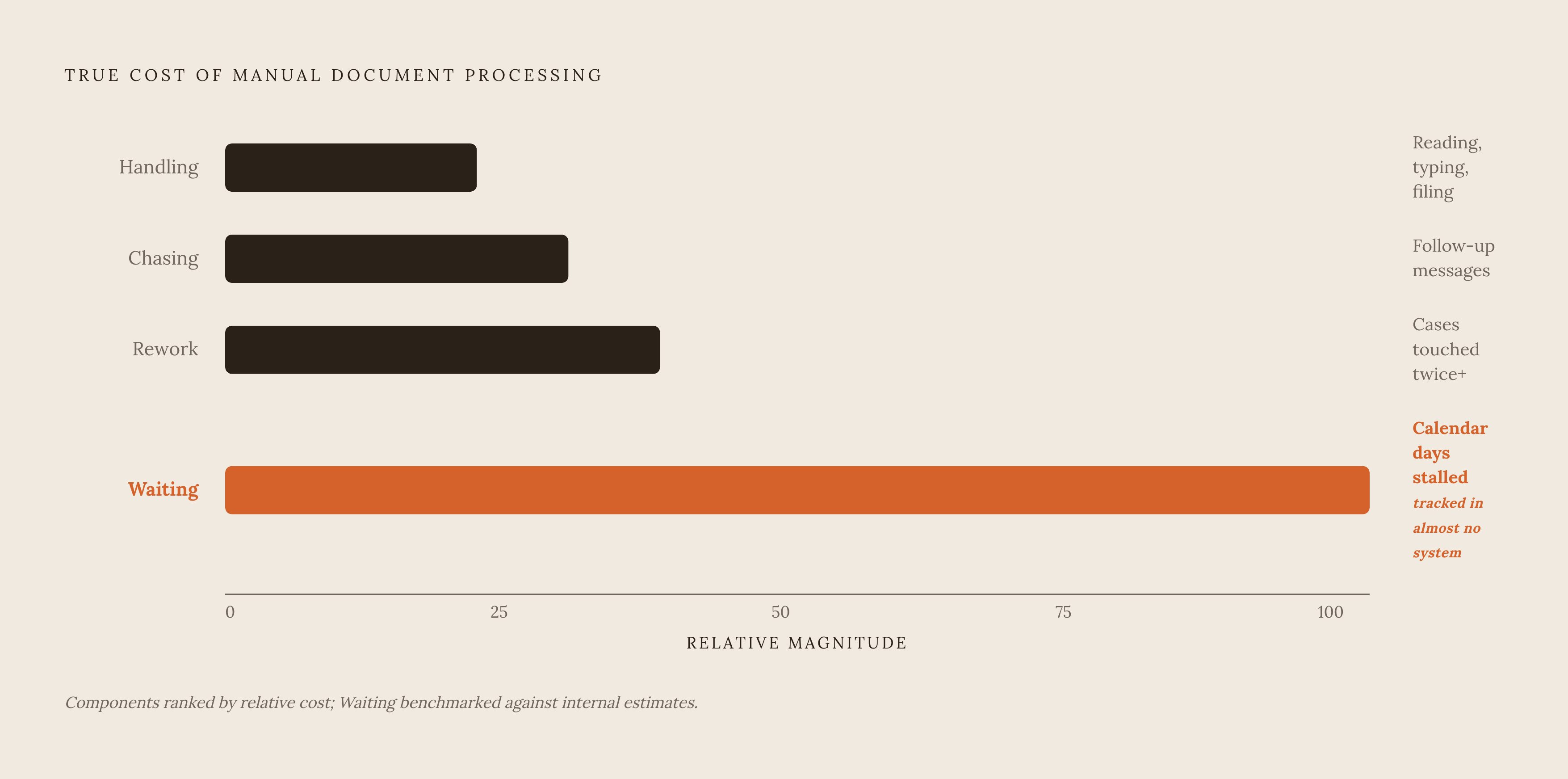
Four cost lines build the true cost of handling a document manually, and most internal estimates only capture the first one.
Handling is the time someone spends reading, typing, checking, and filing a single document. It is the easiest of the four to measure: time a sample of real cases, multiply by loaded labor cost, and the number holds up.
Chasing is every follow-up message you send because a document arrived incomplete, missing, or impossible to read. It almost never appears on a timesheet, living instead in email threads and chat logs, and most teams underestimate it badly because nobody is tracking it on purpose.
Rework is every case touched more than once: an error caught too late, a document that turned out wrong, two systems that disagree with each other. It is visible in edit history on the system of record and in tickets that got reopened, once someone goes looking.
Waiting is the number of calendar days a case sits stalled between a document request going out and a document coming back. It is often the largest of the four numbers, and it is tracked in almost no system anywhere. Automation alone does not remove it either, unless the extraction layer is fast and accurate enough that it can close the loop without a person stepping in partway through.
Put together, the model is simple: monthly case volume times the sum of handling, chasing, and rework hours, times loaded hourly rate, gives a defensible monthly operational cost built entirely on internal numbers. If the organization still keeps physical documents on hand, add in off-site storage, records management labor, and the compliance exposure that comes with holding paper, because those belong in the baseline too.
Published figures on document automation tend to talk about processing time saved and stop there. Fewer mention error rate reduction, cost per document, staffing impact, or compliance risk, even though all four move money. That gap matters for one reason: it means most internal baselines undercount the true cost before anyone even gets to savings, which makes the real business case stronger than the first draft suggests, not weaker.
Teams that run this exercise against accounts payable and work through handling, chasing, and rework line by line usually find their real cost-per-invoice lands well above their first guess. The jump from "we thought it cost about this much" to "it actually costs this much" tends to be the most persuasive few minutes in the entire finance presentation. Once that baseline is locked in, the next job is building a savings projection against it, and that projection is only as strong as the accuracy claim it rests on.
Vendor accuracy claims and the collapse of projected savings
Every savings number in a document automation business case runs on accuracy. If the extraction layer gets fields wrong and a person has to go fix them, the handling cost did not disappear. It moved, usually to a more expensive point further down the workflow, where someone now has to catch an error that looks like correct data.
A system can perform flawlessly in a vendor demo and still fail in a predictable, structural way once it hits real production volume. Merged cells, headers that stack two or three levels deep, and tables that split across pages all trip up extraction in ways that do not look broken on the page. A model can confidently fill in a value for a field it never actually read correctly, and that confident wrong answer is harder to catch than the kind of typo a human makes, because nothing about it looks suspicious.
None of this counts as a rare edge case. Real document sets include handwritten notes in the margins, print that has faded past legibility, layouts nobody designed for, and PDFs that bundle several documents into one file, none of which appear in a vendor's curated demo set.
The financial consequence follows directly from the error rate: at whatever rate a system actually produces, every field that requires manual review or correction has a cost, and multiplying that cost by volume and subtracting it from the projected savings tells you what the automation is actually worth. A system can report a high overall accuracy number and still force a reviewer to check every single field, if it has no way to flag which fields it is confident about and which ones it is guessing on. At that point, it is barely different from manual processing with extra software in the middle.
Confidence scores only help if they are calibrated correctly. A system that routes low-confidence fields to a human and lets high-confidence fields pass straight through only saves money if those confidence scores are honest. If the model is overconfident on exactly the fields it gets wrong, the review queue built to catch errors sails right past them.
Vendor accuracy numbers are usually aggregate figures measured across whatever document set the vendor chose, and production accuracy on an organization's actual document mix can land well below that number. Published calibration research on extraction models found that numeric fields tend to be well-calibrated, but free-text fields show overconfidence at high predicted probabilities, so a high confidence score on a free-text field is less trustworthy than the same score on a number. A CFO who asks what the accuracy is on this organization's specific document types, and gets handed a general benchmark in return, has not actually been answered.
Evaluating vendor accuracy claims before the budget committee
Put an accuracy number in a business case only if it was measured field by field, checked against known-correct answers, on a sample of the organization's own documents, because anything short of that is a promise the budget committee has no way to check.
Field-level evaluation is becoming the standard for a reason: given a document and a schema, an extractor produces a set of fields with values, and evaluation checks how often each individual field type comes out right, rather than scoring the document as a pass or fail in one lump judgment. For something like invoice fields, evaluation typically uses both exact match, for strict correctness, and relaxed match, which allows for the kind of small variation that extraction from scanned or photographed documents introduces. Production pilots consistently show real accuracy swings across field types even inside the same document category. A date field like payment due date can score noticeably lower than a clean numeric field like total amount, and if you know that difference ahead of time, you can model the human-review queue honestly instead of guessing.
There is a direct test for whether a vendor's confidence scores can be trusted: ask for a chart plotting predicted confidence against actual accuracy, broken out by field type, on documents the model was not trained on. A well-built system shows accuracy climbing steadily as confidence climbs. A system with a confidence problem shows fields marked high confidence that turn out correct far less often than that confidence would suggest. If a vendor cannot produce that chart, you cannot use their confidence scores to decide what gets automatic approval and what gets a human look, so every uncertain field needs manual review regardless of what the confidence score claims.
Two checks at the point documents enter the system catch the worst failures before they ever touch the savings math. One checks character count: if the parsed text comes out at a small fraction of the size of the source file, the parser likely failed silently somewhere in the middle. The other checks structure: if a document is supposed to contain tables and the parser returns zero, that document needs a flag before it moves downstream.
A confidence threshold has a real dollar cost attached to it. At whatever threshold sends a field to manual review, calculate what fraction of fields get routed that way, multiply by the cost of reviewing one field by hand, and add that number into the total automation cost. Published research on confidence-based routing shows that a well-calibrated system, at a defined coverage level, can get close to perfect accuracy on the fields it chooses to accept automatically. That result only holds if the calibration behind it is actually sound.
Before the business case goes final, a few questions belong in every vendor conversation. What is the per-field accuracy on invoice numbers, dates, line-item totals, and tax fields, specifically, not an aggregate document score? Are confidence scores calibrated and tied to an actual location on the source document, or are they inferred by the model with nothing grounding them? Will the vendor put the accuracy figure into a contractual SLA, and does the pricing model reflect it, for example by charging only for fields extracted correctly? That last question separates vendors cleanly. One that guarantees accuracy in the contract and prices on correct extraction has incentives lined up with the buyer. One that does neither has handed all the accuracy risk to the customer.
Building the savings projection layer by layer, from field to document to annual volume
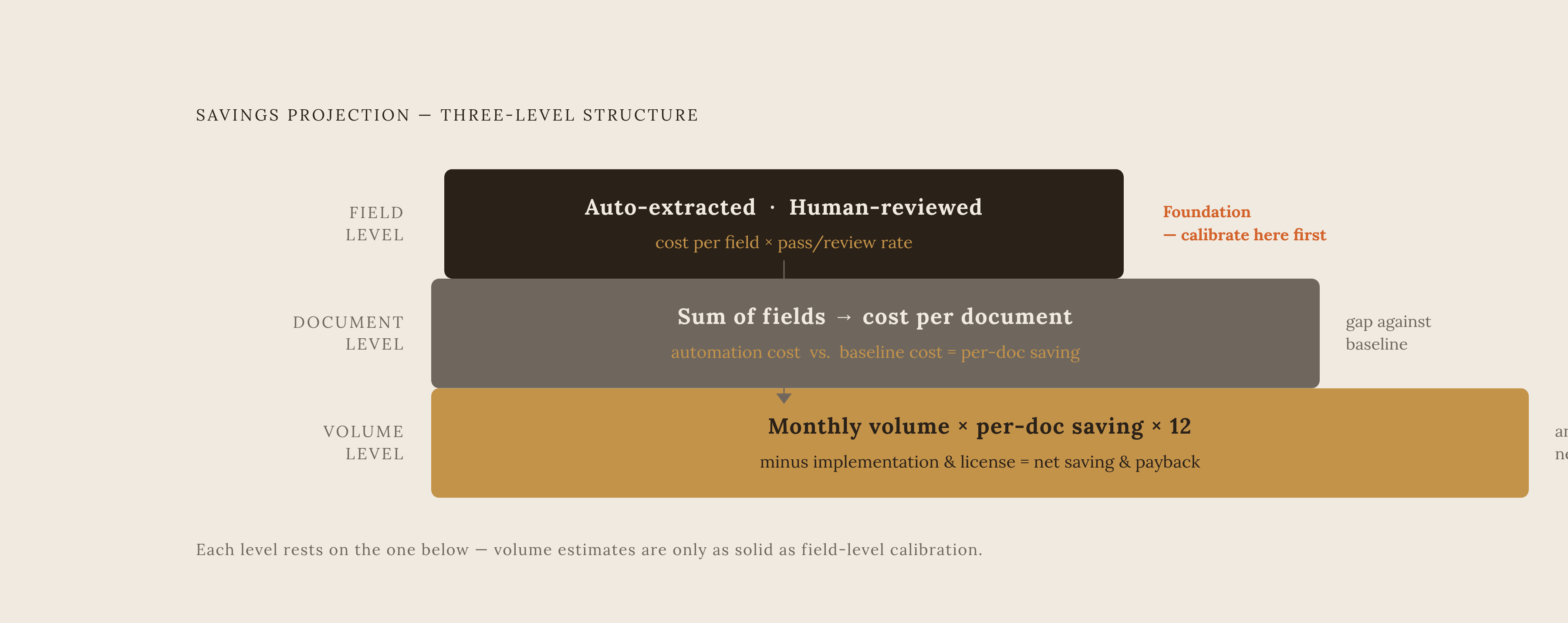
With a verified per-field accuracy number and a routing threshold in hand, the savings projection is no longer a single optimistic figure, but a structure the CFO can take apart and check piece by piece.
The projection builds in three levels, each one resting on the one below it. At the field level, compare the cost of extracting one field correctly through automation against the cost of extracting it by hand. At the verified accuracy rate and chosen confidence threshold, some fraction of fields pass through automatically and some fraction route to a human reviewer, and that split is the foundation everything else is built on. This is exactly where the calibration work from the previous section pays off: a field-level cost model built on calibrated confidence data holds up to scrutiny, while one built on an aggregate accuracy number does not.
At the document level, a document is just a bundle of fields, so the cost-per-document under automation is the sum of what each field costs to process automatically plus the weighted cost of whatever fields get kicked to review. Set that number against the baseline cost-per-document built earlier: the gap between the two is the real per-document saving.
At the volume level, multiply monthly document volume by that per-document saving and annualize it, and you get the gross annual saving. Subtract implementation cost and whatever the subscription or license runs; what is left is net saving and the payback period. Run that math at two or three volume scenarios, current volume, volume with modest growth, and volume at whatever expansion is already planned, because the economics tend to improve as volume rises. That improvement is itself an argument for acting now rather than waiting.
Payback should come as a range, not a single number, and that range should move based on two things that actually determine where a given project lands: how fast implementation goes, and which pricing model the vendor uses. A usage-based pricing model, where cost scales with volume actually processed correctly, keeps the cost line moving in step with the savings line. That is a very different risk profile from a flat annual license charged whether the system performs or not.
Accounts payable remains the clearest place to anchor this model, because it is the most mature deployment context and it has documented deployment patterns that show measurable reductions in cycle time and cost at high invoice volumes. Mortgage lending, insurance claims intake, and healthcare document processing all follow the same underlying logic: high volume, repetitive field extraction, real cost attached to every manual error. The field-to-document-to-volume structure built here applies to any of them without modification.
The compliance and security layer that finance teams increasingly treat as a hard gate
A document automation proposal that skips over data security and compliance architecture increasingly gets stopped at procurement or legal review before it ever reaches the budget committee. If it does get through without that layer addressed, the compliance exposure an ungoverned system creates can outweigh every dollar the operational savings promised. The savings model built in the previous section only holds up if the system producing those savings is also one finance and legal can sign off on without reservation, and the right vendor choice closes that gap rather than opening a new one.